
We've updated our color palette generator to use the oklch() notation, part of the CSS Color Level 4 standard. This change moves our tool from legacy color models (RGB/HSL) to a modern, perceptually uniform space, resulting in better, more predictable color palettes for your design systems.
Here is a breakdown of why this color space is the new standard and why it's a huge upgrade for color modification and generation.
Too Long To Read
oklch() is a new way to define CSS colors:
- L (Lightness): This channel determines the perceived brightness of the color, ranging from 0 (black) to 1 (white). Crucially, this value is perceptually uniform, ensuring that equal numerical steps result in equal visual changes across all color families, unlike the unreliable `L` in `hsl()`.
- C (Chroma): Represents the colorfulness or intensity of the color. A value of 0 indicates a pure gray (no color), and higher values move toward the maximum saturation available for that specific hue.
- H (Hue): This is defined by a circular angle (0° to 360°) on the color wheel, which specifies the primary shade (e.g., 0 is red, 90 is yellow-green, 270 is magenta).
- a (Alpha/Opacity): An optional parameter controlling the color's transparency, where 1 or 100% is fully opaque and 0 is fully transparent.
.element {
  color: oklch(0.45 0.26 264); /* A predictable blue*/
  background-color: oklch(1 0 0); /* Pure white*/
  border-color: oklch(0 0 0 / 50%); /* Semi-transparent black*/
}
Key Advantages of OKLCH
- Simplified Palette Generation: By allowing the definition of a simple formula, OKLCH frees designers from the need to manually choose every color, enabling the automatic generation of entire, scalable color palettes for complex design systems.
- Access to Wide-Gamut (Display P3): OKLCH unlocks a significantly larger spectrum of colors than the old sRGB standard, allowing us to specify richer, more vibrant tones available on modern Display P3-compatible devices.
- Reliable Color Modification: The use of perceptual lightness inherently solves the problems common with HSL, preventing unexpected hue shifts or brightness dips when modifying a color, such as when using functions like `darken()` in preprocessors.
- Improved Accessibility (A11y): Because the Lightness (L) component is so predictable, meeting WCAG contrast ratio requirements becomes more reliable and easier to calculate than with traditional, non-perceptually uniform color spaces.
- Intuitive Readability: Similar to HSL but with better lightness encoding, the L, C, and H values provide immediate, human-readable information about a color's tone, intensity, and lightness, simplifying communication across development and design teams.
The Gamut Challenge
The primary challenge of modern color spaces is gamut clipping: not every combination of L, C, and H will result in a color that can be displayed on a standard monitor (especially sRGB).
- Our Solution: Our updated generator is designed to manage this. We guide you to ensure your core colors are within or gracefully mapped to the supported gamuts, preventing unintended shifts on different devices.
We are committed to building out the tooling around this space, and we believe OKLCH is the only way to build truly scalable and reliable color systems today.
We are committed to building out the tooling around this space, and we believe OKLCH is the only way to build truly scalable and reliable color systems today.
If you are still interested want to hear the full story, lets start!
How CSS Colors Have Evolved
CSS Colors Module 4
The CSS Color Module Level 4 specification, which became a Candidate Recommendation on July 5, 2022, represents a massive leap forward. As of August September 2025, the oklch() notation is widely supported across modern browsers and devices.
It introduced syntactic sugar to simplify older color functions. For instance, the use of commas and the explicit `rgba()` function are no longer mandatory:
.old {
  color:   rgb(51, 170, 51);
  color:   rgba(51, 170, 51, 0.5);
}
.new {
  color:   rgb(51 170 51);
  color:   rgb(51 170 51 / 50%);
}
More importantly, CSS Color 4 added 14 new ways to define colors. These new methods, like OKLCH,are not just cosmetic; they improve code readability, enhance accessibility, and unlock the full color potential of modern hardware.
Embracing P3 Wide-Gamut Colors
For years, web color has been limited to sRGB, which renders only about 35% of the colors visible to the human eye. New screens, particularly modern Apple devices and many OLED displays, support the P3 (wide-gamut) color space, adding approximately 30% more colors. This is no longer future tech—it's standard on the majority of new hardware.
- These new colors are often more saturated, allowing designers to produce more eye-catching landing pages and user interfaces.
- The additional color space provides designers with greater flexibility for palette generation and building sophisticated design systems.
While we have access to these P3 colors, older formats like `rgb()`, `hsl()`, or hex codes cannot be used to define them. A new function, such as color(display-p3 1 0 0), could be used, but it suffers from the same readability issues as the legacy RGB format. Fortunately, OKLCH provides the ideal solution: it is highly readable, natively supports P3 and beyond, and is capable of encoding virtually any color visible to the human eye.

CSS Native Color Manipulations
Even though CSS Color 4 represents significant progress, the future CSS Color 5 module promises even greater utility by finally introducing native color manipulation capabilities directly into CSS.
/* These examples use hsl() for illustrative purposes.
   Don't use it in real code since hsl() format has bad a11y. */
:root {
  --accent:   hsl(63 61% 40%);
}

.error {
  /* Red version of accent color */
  background:   hsl(from var(--accent) 20 s l);
}

.button:hover {
  /* 10% lighter version */
  background:   hsl(from var(--accent) h s calc(l + 0.1));
}
This new syntax allows developers to reference a base color (e.g., via a custom property) and modify its individual components. A significant limitation arises, however, when using the hsl() format: the output colors suffer from unpredictable lightness. This occurs because the `l` (lightness) values in HSL are not uniform across different hues, negatively impacting accessibility and visual harmony.
This problem underscores a recurring need: we require a color space that ensures color manipulations consistently produce the expected visual results. This is precisely where OKLCH proves invaluable.
:root {
  --accent:   oklch(0.7 0.14 113);
}

.error {
  /* Red version of accent color (only changes Hue to 15) */
  background:   oklch(from var(--accent) l c 15);
}

.button:hover {
  /* 10% lighter version (only changes Lightness) */
  background:   oklch(from var(--accent) calc(l + 0.1) c h);
}
A quick note: While the `oklch(from ...)` function doesn't strictly require the original `--accent` variable to be defined in OKLCH, maintaining a consistent color format throughout your variables greatly enhances both code readability and predictable color transformations.
Comparing OKLCH with Other CSS Color Formats
OKLCH vs. RGB/Hex
Legacy color models such as rgb(109 162 218), standard hexadecimal codes like #6ea3db, and the newer P3 function color(display-p3 0.48 0.63 0.84) all rely on three numerical values to define levels of red, green, and blue components. (It's worth noting that the maximum value of 1 in color(display-p3) represents a wider color range than the maximum of 255 in sRGB/Hex.)
These additive color models suffer from a fundamental issue: they are practically unintelligible to most developers. They are often treated as abstract values without providing an intuitive basis for understanding or logically modifying the color's appearance.
Modifying colors using RGB, Hex, or color(display-p3) is cumbersome because adjusting colors by manipulating red, green, and blue components is counter-intuitive to human thought processes. Additionally, standard RGB and Hex formats are restricted and cannot access the P3 wide color gamut.
In contrast, perceptual models like OKLCH, LCH, and HSL are much more user-friendly, offering components that align with how humans describe color. Specifically, OKLCH and LCH utilize three parameters: lightness, chroma (saturation), and hue.
Examine Hex vs. OKLCH for predictable color adjustments:
/* HEX */
.button {
  /* Blue */
  background:   #6ea3db;
}
.button:hover {
  /* More bright blue */
  background:   #7db3eb;
}
.button.is-delete {
  /* Red with the same saturation */
  background:   #d68585;
}

/* VERSUS OKLCH */

.button {
  /* Blue */
  background:   oklch(0.7 0.1 250);
}
.button:hover {
  /* A brighter blue (Lightness clearly increases) */
  background:   oklch(0.75 0.1 250);
}
.button.is-delete {
  /* Red with the same saturation (Hue clearly changes) */
  background:   oklch(0.7 0.1 20);
}
The intuitive nature of OKLCH components is a clear advantage. However, the one notable drawback is that, unlike older spaces, OKLCH is a relatively new color space, and its supporting ecosystem and tools are still maturing.
OKLCH vs. HSL
Next, let's consider the comparison between OKLCH and HSL, which also uses three numbers—hue, saturation, and lightness—formatted as hsl(210 60% 64%).
HSL's primary issue stems from its flawed cylindrical color space design. It incorrectly enforces the same maximum saturation (0–100%) for every hue. Our visual system and displays actually handle different hues with highly varied maximum saturation limits, a complexity that HSL obscures by distorting the color space to fit its fixed parameters.
Consequently, this distorted color space is unsuitable for reliable color adjustments, as the `L` (lightness) component is not perceptually accurate. The perceived brightness varies significantly across different hues, leading to contrast problems and poor accessibility.
- Increasing lightness by a fixed amount (e.g., 10%) yields inconsistent visual shifts between colors like blue and purple, a common source of unexpected output with preprocessor functions like SASS's `darken()`.
- Similarly, shifting the hue (e.g., changing an accent color to a warning red) can inadvertently shift the lightness, potentially degrading text readability due to reduced contrast.
Due to these limitations, HSL is widely discouraged for sophisticated color manipulation, with many design teams recommending developers avoid HSL entirely for system palette creation. Furthermore, HSL shares the same limitation as RGB and Hex: it cannot encode P3 wide-gamut colors.
OKLCH, in contrast, accurately maps the true color space without distortion, embracing its inherent complexity. This fidelity guarantees predictable lightness when colors are transformed and enables native definition of P3 colors. While this means some OKLCH numerical combinations fall outside the sRGB gamut (visible only on wide-gamut displays), modern browsers handle this intelligently by clipping the color to the nearest representable value.
Understanding the OKLCH Color Model
A Brief History and Adoption
The Oklab and OKLCH color spaces were developed by Björn Ottosson in 2020 primarily to address and correct perceptual inconsistencies found in older models like CIE LAB and LCH. Björn published an excellent article explaining the motivation and implementation details behind their creation.
Although Oklab is a very modern innovation—which is its main point of fragility—it has seen remarkable adoption in just a few years:
- It has been formally incorporated into the CSS specification.
- It now enjoys native support for the oklch() function across major browsers, including Chrome, Safari, and Firefox.
- Tools like Adobe Photoshop have integrated Oklab for superior gradient interpolation.
- It is utilized in advanced color palette generators to ensure high accessibility standards.
- It is accessible in design applications like Figma via dedicated plugins.
Given the major enhancements introduced by CSS Colors Levels 4 and 5, we believe now is the optimal time to embrace this superior color solution. Adopting these new CSS features naturally requires establishing a new ecosystem of tools and best practices.
Dissecting the OKLCH Axes
Colors within the OKLCH model are defined using four potential parameters. In CSS syntax, this is written as oklch(L C H) or, with an alpha channel, oklch(L C H / a).

Here is a breakdown of what each value signifies:
- L (Perceived Lightness): This is a value from `0` (pure black) to `1` (pure white). It also accepts percentage values (`0%` to `100%`), though using a simple number is recommended, as percentages can be problematic within `calc()` or relative color functions.
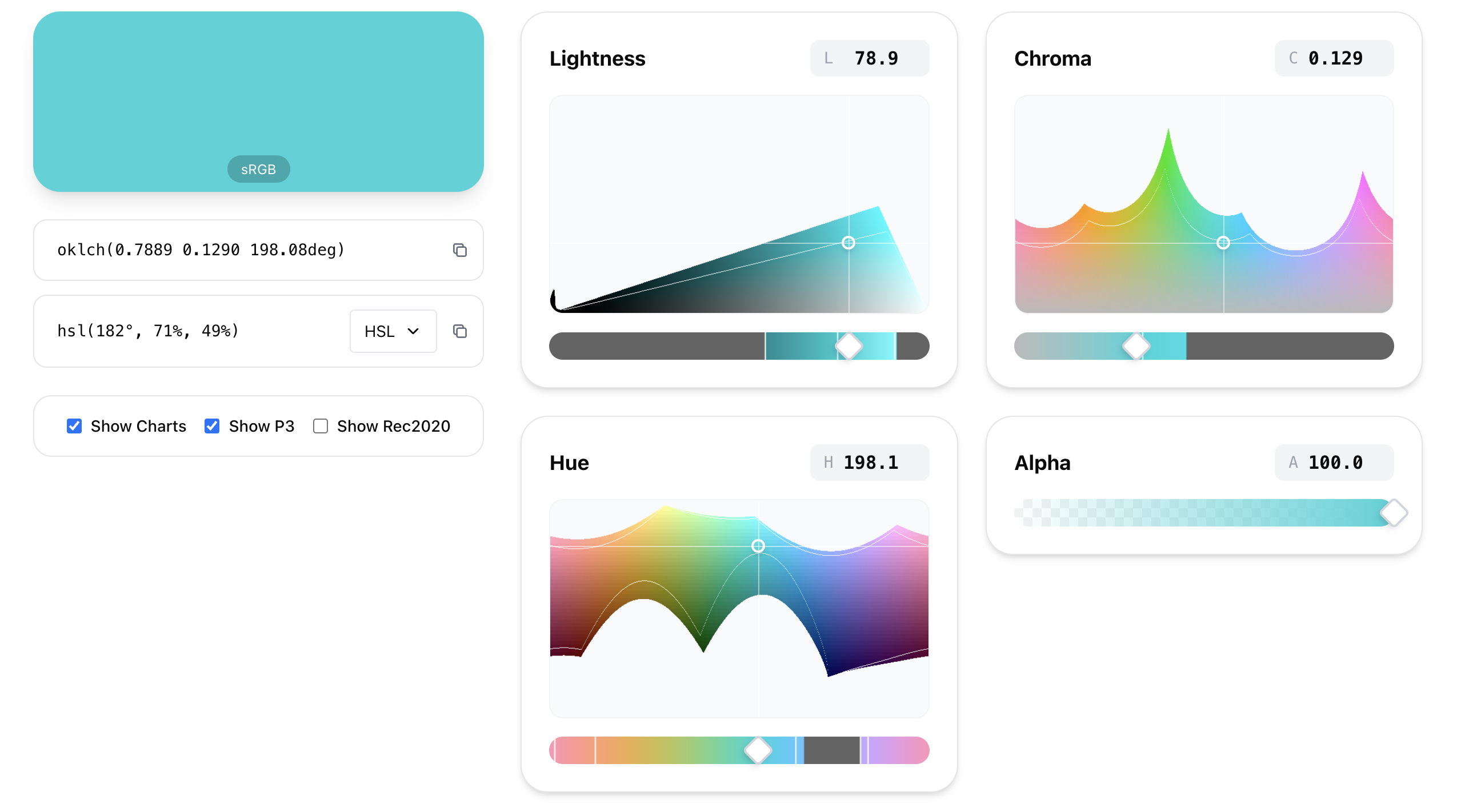
- C (Chroma): Represents the color's intensity or saturation, starting at `0` (grayscale) and extending theoretically toward infinity. In practice, the maximum value is limited by the display's color gamut (P3 will permit higher values than sRGB). Maximum chroma usually falls below `0.37`.
- H (Hue Angle): The angle on the color wheel, ranging from `0` to `360` degrees. Key points include Red (around `20`), Yellow (`90`), Green (`140`), Blue (`220`), and Purple (`320`). You can use the unit `deg` (e.g., `60deg`) or omit the unit (e.g., `60`).
- a (Opacity): The alpha channel, defined by a number from `0` to `1` or a percentage from `0%` to `100%`.
Examples of OKLCH Color Definitions:
.grayscale {
  color:   oklch(0 0 0);          /* Pure black */
  color:   oklch(1 0 0);          /* Pure white */
  color:   oklch(0.5 0 0);        /* Neutral gray */
}
.colors {
  color:   oklch(0.8 0.15 175);   /* A bright cyan */
  color:   oklch(0.6 0.15 175);   /* Same cyan, much darker */
  color:   oklch(0.8 0.04 175);   /* Desaturated/pale cyan */
  color:   oklch(0.8 0.15 30);    /* A vivid orange, same perceived lightness as above */
}
.modifiers {
  color:   oklch(0.8 0.15 175 / 30%); /* Transparent cyan */
  color:   oklch(1 0 none);       /* White is valid with 'none' for Hue/Chroma */
}
It's important to understand that some components might result in a value of `none` following a color transformation. For instance, white has no chroma or specific hue, and in such cases, browsers will treat `none` as `0`.
Device Independence & Gamut Mapping
One of the most powerful features of OKLCH is its device independence. Unlike older formats designed solely for standard sRGB monitors, OKLCH is capable of encoding any color imaginable—covering sRGB, P3, Rec2020, and even theoretical colors that future displays might support.
While you can define these colors in code, not every monitor can physically display them. However, you generally don't need to worry about breaking the user experience. When a browser encounters a color that a monitor cannot display (an "out of gamut" color), it performs a process called "gamut mapping" to render the closest possible alternative.
This device independence explains why you might notice "holes" or uneven shapes in an OKLCH color picker. Every hue has a unique maximum chroma limit due to the laws of physics and the limitations of human vision. For example, at certain lightness levels, deep blues can achieve very high chroma, whereas greens or reds at that same lightness physically cannot be as saturated.
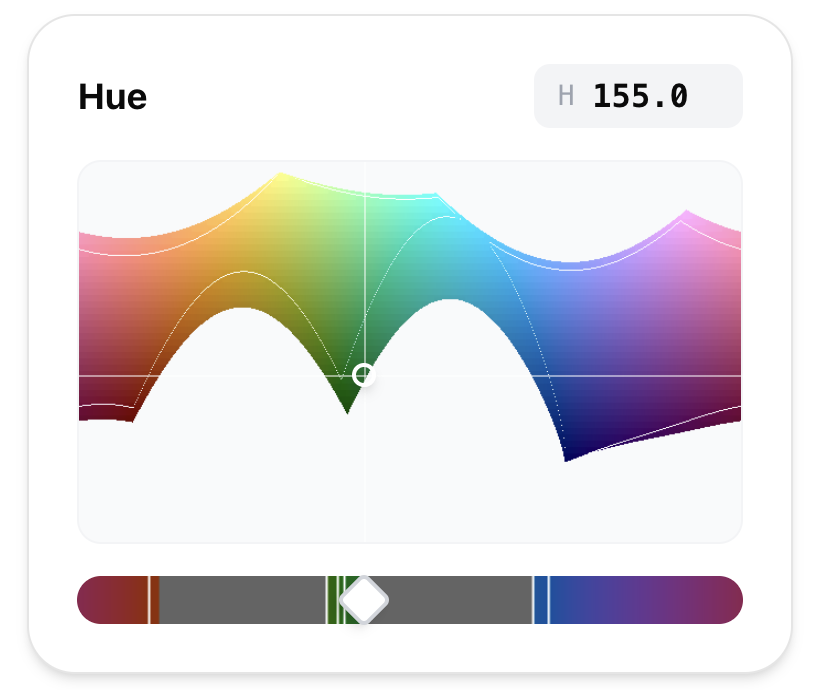
Browsers typically use one of two methods to handle this mapping:
- Clipping (Fast but Destructive): The browser converts the color to RGB/P3 and strictly chops off any values outside the 0–100% range (e.g., rgb(135% -10% 20%) becomes rgb(100% 0% 20%)). This is computationally cheap but often shifts the hue, leading to noticeable visual errors.
- Chroma Reduction (Accurate but Slower): The browser stays in the OKLCH space and intelligently reduces chroma and lightness until the color fits the screen's capabilities. This preserves the original hue, which is crucial for design intent.
Although the CSS Color Level 4 specification mandates the accurate chroma reduction method, many browsers (like Chrome and Safari) currently default to the faster clipping method for performance reasons. To ensure your colors look correct everywhere, we recommend manually handling this fallback using the color-gamut media query:
.neon-highlight {
  /* Fallback for standard sRGB screens */
  background: oklch(0.65 0.18 150);
}

@media (color-gamut: p3) {
  .neon-highlight {
    /* Vivid color visible only on P3-compatible displays */
    background: oklch(0.65 0.28 150);
  }
}
Summary of Benefits: Why Adopt OKLCH
We've fully transitioned to using OKLCH across our projects, and the current website you're viewing also leverages the oklch() function. The benefits realized from this migration are substantial and cover key areas of development, design, and accessibility:
-
Enhanced Code Clarity and Readability
OKLCH values instantly communicate the color's properties, making the code self-explanatory. This is especially useful for quickly identifying accessibility issues, such as insufficient contrast, directly from the source code:
.primary-text { /* ISSUE: Lightness difference (0.9 vs 1.0) is too small for WCAG contrast standards */ background: oklch(0.9 0.03 270); color: oklch(1 0 0); } .secondary-element { /* NOTE: Color variance is minimal, indicating a small hue shift (250 to 240) */ background: oklch(0.85 0.05 250); color: oklch(0.5 0.10 240); } -
Simplified and Predictable Color Adjustments
Applying minor color modifications, like lightening or darkening, yields precise, perceptually accurate results because OKLCH's Lightness axis is reliable:
.cta-button { background: oklch(0.55 0.15 285); } .cta-button:hover { /* Predictably brighter by increasing L from 0.55 to 0.65 */ background: oklch(0.65 0.15 285); } -
Leveraging Relative Colors for Design Systems
OKLCH is the optimal color space for creating dynamic design systems using CSS Relative Colors. Automated color transformations can be based on base variables, ensuring consistency across states:
.dynamic-button { background: var(--button-base); } .dynamic-button:hover { /* Universal hover state: Increase lightness by 0.1 while keeping chroma and hue */ background: oklch(from var(--button-base) calc(l + 0.1) c h); } .dynamic-button { --button-base: var(--brand-blue); } .dynamic-button.warning { --button-base: var(--caution-orange); } -
Seamless Wide-Gamut (P3) Support
The same color functions can define both standard sRGB and high-chroma P3 colors, simplifying the adoption of wide-gamut displays for richer visuals:
.accent-box { background: oklch(0.5 0.20 190); } @media (color-gamut: p3) { .accent-box { /* Same lightness and hue, but with higher P3 chroma (0.20 -> 0.30) */ background: oklch(0.5 0.30 190); } } -
Improved Collaboration with Design Teams
By closely mirroring real-life color perception, using oklch() naturally increases a developer's understanding of color science. Crucially, as modern design tools increasingly adopt Oklab for accessibility and palette generation, using oklch() in CSS creates a single, consistent color language, drastically improving communication and reducing friction between design and development workflows.
Try Palettt Today
Create, refine, and export beautiful color palettes in just a few clicks.
Start using Palettt →